PostgreSQL using lot of disk space for pgsql_tmp files

The container timescaledb is using lot of disk space and when the docker filesystem is full it crashes and cleans all the data.
For more context, we have xormon-ng and timescaledb containers running. The docker filesystem is around 1TB of space:
Filesystem Size Used Avail Use% Mounted on
/dev/mapper/vg_data-varlibdocker 1008G 354G 654G 36% /var/lib/docker
In this chart you can see that every 2h more or less it gets full and cleans itself:

After connecting to the container shell we found lot of pgsq_tmp fles being generated in /var/lib/postgresql/data/base/pgsql_tmp
144a1b83e2b4:/var/lib/postgresql/data/base/pgsql_tmp# du -sm *
1025 pgsql_tmp2003098.0
1025 pgsql_tmp2003098.1
1025 pgsql_tmp2003098.10
1025 pgsql_tmp2003098.100
1025 pgsql_tmp2003098.101
...
144a1b83e2b4:/var/lib/postgresql/data/base/pgsql_tmp# du -sh .
265.0G .
144a1b83e2b4:/var/lib/postgresql/data/base/pgsql_tmp# ls | wc -l
273
For some reason is not using all the memory the OS has available and then it writes query temp files to disk:

Any idea how to fix it?
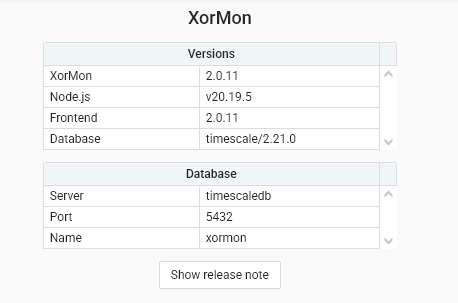
Versions used:
Comments
-
Hi,
we've encountered this issue before. TimescaleDB versions 2.21.x are broken. It would be best to upgrade to the latest timescaledb docker version(as of now 2.23.0).
https://docs.tigerdata.com/self-hosted/latest/upgrades/upgrade-docker/
careful on the 4th and 5th step, this would up version of database postgres, we want to up version of database xormon so use this command instead
docker exec -it <CONTAINER_NAME> psql xormon postgres -Xc "ALTER EXTENSION timescaledb UPDATE;" -
Thanks for the hint @damerva but I have some issues. It doesn't start with the new version, get this error:
# docker logs timescaledb
PostgreSQL Database directory appears to contain a database; Skipping initialization
2025-11-06 14:22:42.480 EET [7] FATAL: database files are incompatible with server
2025-11-06 14:22:42.480 EET [7] DETAIL: The data directory was initialized by PostgreSQL version 16, which is not compatible with this version 17.6.
So I can't run the ALTER EXTENSION update..
-
Oh I see, in this case go through the documentation again, but replace the first step with this command
docker pull timescale/timescaledb:latest-pg16 -
I don't get it, if i use
docker pull timescale/timescaledb:latest-pg16I'm back to where I started. How can I make it work with pg17 image? -
I apologize, my previous response was incomplete. What we want is to upgrade TimescaleDB version not necessarily the PostgreSQL version as that is not needed as of now and is more difficult(would require data migration) and pg16 will be supported for quite some time.
As the previous version you were using is ran on PostgreSQL 16 with TimescaleDB extension version 2.21.0. You want to keep the pg16 image but upgrade version of the extension, which pg16 latest should do (or you can specify the version you want :
docker pull timescale/timescaledb:2.23.0-pg16)after that you use your chosen version in the docker run command
docker run -v <volume ID>:/pgdata -e PGDATA=/pgdata
  -d --name timescaledb -p 5432:5432 timescale/timescaledb:2.23.0-pg16
-
I'm still having the same issue after updating to 2.23.0-pg16

Howdy, Stranger!
Categories
- 1.7K All Categories
- 123 XorMon
- 26 XorMon Original
- 175 LPAR2RRD
- 14 VMware
- 20 IBM i
- 2 oVirt / RHV
- 5 MS Windows and Hyper-V
- Solaris / OracleVM
- 1 XenServer / Citrix
- Nutanix
- 8 Database
- 2 Cloud
- 10 Kubernetes / OpenShift / Docker
- 141 STOR2RRD
- 20 SAN
- 7 LAN
- 19 IBM
- 8 EMC
- 12 Hitachi
- 5 NetApp
- 17 HPE
- 1 Lenovo
- 1 Huawei
- 3 Dell
- Fujitsu
- 2 DataCore
- INFINIDAT
- 4 Pure Storage
- Oracle