custom certificates (SSL Cert) Problems

Dear Team, dear community.
I've uploaded the server certificates to Xormon. Unfortunately, I had a typo in the alias and had to reapply.
Now I can't change the certs in the Application => SSL Cert section anymore.
I "Click to Upload crt / key" give it the files and click on "Upload & Apply" but nothing happens.
A reload of the WebGui is not helping and a container restart also didn't work.
I deleted the certificates in the folder manually to check if I can upload the new ones. Not working.
Also, I have a question about renewing the certs. We are using the salt stack to manage our servers incl. the certs. So if salt would place the new cert files in the folder ./files/cert would it be recognized by Xormon, or do I have to restart the container?
Many thanks in advance.
Kinds regards,
Jörg
Comments
-
Hi Jorg,
how did you upload the certificate? It always needs to be uploaded via the form in the GUI.
The path to the certificate is then stored in the database. That's why you can't overwrite files, you always need to use the form.
If nothing happens after clicking, please send the logs, there is probably an error.
UI --> (Help -->) Logs --> Support Log --> Export All Logs: follow the form
Send us generated file via https://upload.xormon.com
You can automate the certificate upload via the Public API, there is an endpoint for certificate upload.
-
Hello Metej,
yes I've uploaded the certificates via the webgui. But I have to change the it again, because of a typo in the alias.
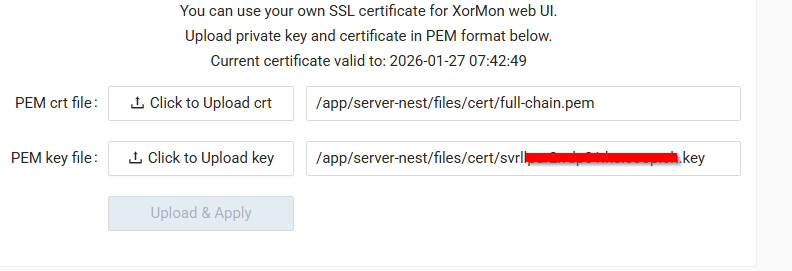
Unfortunately, after clicking on Upload, nothing happens.
kind regards,
Joerg
-
I am running into the same issue with a new install. Click Upload & Apply and nothing changes. What was the solution here?
-
Found my problem - used the wrong key file.
2026-04-15 13:01:33: [UploadCertificate] Error: Certificate is not signed by the given public key


Howdy, Stranger!
Categories
- 1.7K All Categories
- 137 XorMon
- 26 XorMon Original
- 179 LPAR2RRD
- 14 VMware
- 21 IBM i
- 2 oVirt / RHV
- 5 MS Windows and Hyper-V
- Solaris / OracleVM
- 1 XenServer / Citrix
- Nutanix
- 8 Database
- 2 Cloud
- 10 Kubernetes / OpenShift / Docker
- 142 STOR2RRD
- 20 SAN
- 7 LAN
- 19 IBM
- 8 EMC
- 12 Hitachi
- 5 NetApp
- 17 HPE
- 1 Lenovo
- 1 Huawei
- 3 Dell
- Fujitsu
- 2 DataCore
- INFINIDAT
- 4 Pure Storage
- Oracle