Unable to see new p10 frames and the lpars running on the new frame

We have recently moved form p9 to p10 frames,,we have moved our lpars from p9 to p10 frames after the movement is done we are not able to see the lpars and vios and frames associated with p10..
We see lpar2rrd is running fine on the server..infact we have upgrade the lpar2rrd to the latest version on the aix server but still it is not showing on the gui
agent
****
[iedcbadmin1:root-/home/homeldap/in074897/p10-lpar2rrd-] ps -ef | grep -i lpar2rrd
lpar2rrd 11207148 24969522 0 15:31:01 - 0:00 vmstat -I -W -t 60 1
root 13697480 50135490 0 15:31:10 pts/12 0:00 grep -i lpar2rrd
lpar2rrd 24969522 42598736 0 15:31:00 - 0:00 /usr/bin/perl /opt/lpar2rrd-agent/lpar2rrd-agent.pl 10.254.9.210
lpar2rrd 31261140 24969522 0 15:31:01 - 0:00 /usr/bin/perl /opt/lpar2rrd-agent/lpar2rrd-agent.pl 10.254.9.210
lpar2rrd 40501726 31261140 0 15:31:01 - 0:00 iostat -Dsal 60 1
lpar2rrd 41026028 24969522 0 0:00 <defunct>
You have mail in /usr/spool/mail/root
[iedcbadmin1:root-/home/homeldap/in074897/p10-lpar2rrd-] rpm -qa | grep -i lpar2rrd
lpar2rrd-agent-8.10-0.ppc
server
****
[iedcbperf:root-/lpar2rrd/data/DB92-B47-9043-MRX-SN7808BAY/uedci001-] pwd
/lpar2rrd/data/DB92-B47-9043-MRX-SN7808BAY/uedci001
-rw-r--r-- 1 lpar2rrd staff 1166 Sep 14 15:03 cpu.cfg-uedcbvdb92a
-rw-r--r-- 1 lpar2rrd staff 1166 Sep 14 15:03 cpu.cfg-uedcbvdb92b
-rw-r--r-- 1 lpar2rrd staff 1075 Sep 14 15:03 cpu.cfg-hedcb020
-rw-r--r-- 1 lpar2rrd staff 1166 Sep 14 15:03 cpu.cfg-uedcb665
-rw-r--r-- 1 lpar2rrd staff 1166 Sep 14 15:03 cpu.cfg-uedcb669
-rw-r--r-- 1 lpar2rrd staff 1166 Sep 14 15:03 cpu.cfg-uedcb672
-rw-r--r-- 1 lpar2rrd staff 1167 Sep 14 15:03 cpu.cfg-uedcb754
-rw-r--r-- 1 lpar2rrd staff 1166 Sep 14 15:03 cpu.cfg-uedcb674
-rw-r--r-- 1 lpar2rrd staff 1167 Sep 14 15:03 cpu.cfg-uedcb061
-rw-r--r-- 1 lpar2rrd staff 1075 Sep 14 15:03 cpu.cfg-uedcb630
-rw-r--r-- 1 lpar2rrd staff 1166 Sep 14 15:03 cpu.cfg-uedcb675
-rw-r--r-- 1 lpar2rrd staff 1166 Sep 14 15:03 cpu.cfg-uedcb684
-rw-r--r-- 1 lpar2rrd staff 1166 Sep 14 15:03 cpu.cfg-uedcb600
-rw-r--r-- 1 lpar2rrd staff 1166 Sep 14 15:03 cpu.cfg-uedcb631
-rw-r--r-- 1 lpar2rrd staff 1166 Sep 14 15:03 cpu.cfg-uedcb129
-rw-r--r-- 1 lpar2rrd staff 1166 Sep 14 15:03 cpu.cfg-uedcb107
-rw-r--r-- 1 lpar2rrd staff 1166 Sep 14 15:03 cpu.cfg-uedcb686
-rw-r--r-- 1 lpar2rrd staff 1166 Sep 14 15:03 cpu.cfg-iedcbadmin1
-rw-r--r-- 1 lpar2rrd staff 1083 Sep 14 15:03 cpu.cfg-uedcb758
-rw-r--r-- 1 lpar2rrd staff 1075 Sep 14 15:03 cpu.cfg-hedcb004
-rw-r--r-- 1 lpar2rrd staff 24 Sep 14 15:03 lpm-exclude.txt
-rw-r--r-- 1 lpar2rrd staff 9443 Sep 14 15:03 cpu.html
-rw-r--r-- 1 lpar2rrd staff 3634 Sep 14 15:03 mem.html
-rw-r--r-- 1 lpar2rrd staff 542 Sep 14 15:03 gui-change-state.txt
-rw-r--r-- 1 lpar2rrd staff 227 Sep 14 15:03 gui-change-config.txt
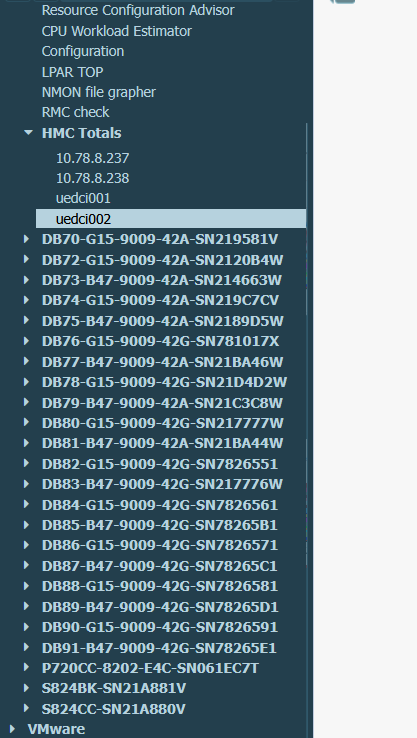
now when i refer to gui i am attaching the screenshot of the page where i dont see the frame db92 and the lpars running under it
if you see in the screen shot you only see p9 frames but not p10 frames for eg db92..but all the data is getting captured on the lpar2rrd servers
i am open for a quick call if possible
Comments
-
send us logs
Note a short problem description in the text field of the upload form.
under lpar2rrd user:
cd `cat ~/.lpar2rrd_home`
gzip -9 logs.tar
Send us logs.tar.gz via https://upload.lpar2rrd.com
-
Hi Pavel,
we have the lpar2rrd rpm package installed on the client but it is not reflecting on the gui page that we have ,,we see this on the new p10 frames ..
You need the logs to be collected from the lpar2rrd server or agent
[iedcbadmin1:root-/home/root-] su - lpar2rrd
$ cd `cat ~/.lpar2rrd_home`
cat: 0652-050 Cannot open /home/lpar2rrd/.lpar2rrd_home.
$ cd
$ cd `cat ~/.lpar2rrd_home`
cat: 0652-050 Cannot open /home/lpar2rrd/.lpar2rrd_home.
$ cd
$ cat ~/.lpar2rrd_home
cat: 0652-050 Cannot open /home/lpar2rrd/.lpar2rrd_home.
$ gzip -9 logs.tar
gzip: logs.tar: No such file or directory
$
-
execute that under lpar2rrd user
-
You can clsoe this call issue has been resolved

Howdy, Stranger!
Categories
- 1.7K All Categories
- 132 XorMon
- 26 XorMon Original
- 178 LPAR2RRD
- 14 VMware
- 20 IBM i
- 2 oVirt / RHV
- 5 MS Windows and Hyper-V
- Solaris / OracleVM
- 1 XenServer / Citrix
- Nutanix
- 8 Database
- 2 Cloud
- 10 Kubernetes / OpenShift / Docker
- 142 STOR2RRD
- 20 SAN
- 7 LAN
- 19 IBM
- 8 EMC
- 12 Hitachi
- 5 NetApp
- 17 HPE
- 1 Lenovo
- 1 Huawei
- 3 Dell
- Fujitsu
- 2 DataCore
- INFINIDAT
- 4 Pure Storage
- Oracle