VMware VM Error: Cannot find item in merged tree

Hello,
We are running XorMon appliance and pulling metrics on our VMware Cluster, it has been awhile since I had to drill into VM details, but today noticed that I can't do this, I see the VM in the "VM TOP" page, however the VM itself does not appear in the list of VMs (bunch of VMs missing, only a few actually show up).
Not sure why this is not working, we are on VMware vCenter v8.0.3 build 24674346 with ESXi 8.0.3 build 24674464.
Below is the XorMon-NG version details:
XorMon 2.1.10
Node.js v20.18.0
Frontend 2.1.10
Database timescale/2.16.1
Appliance 1.6.10
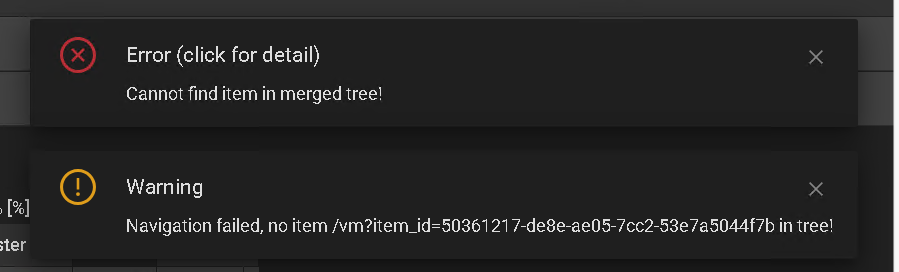
Also attached is the error we get, any idea what the issue or how I can fix this?
Comments
-
Send us logs and a screenshot(s) with the problem
UI --> Settings --> (Help -->) Logs --> Support Log --> Export All Logs: follow the form
Send us generated file via https://upload.xormon.com
-
Hi Pavel,
Logs have been uploaded.
-
I wonder if deleting the vCenter server to clear out what's there now and starting fresh for the VMware monitoring would fix this.
-
no, as I wrote you, same VM UUIDs in 2 attached vCenters, we have to find some solution for that
-
Thanks for the update Pavel!
-
Is there any solution to this?
-
not yet, it is a complex job, we have to move out from vmware UUIDs are they might not be unique (dues to VM cloning etc)
I guess it could be done in 1 month, fee free to ask us then
-
Thanks for the update Pavel!
-
Hi Pavel, I saw there was a newer release, was this bugfixed?
-
no, the issue is still open
-
That worked, thanks Pavel.

Howdy, Stranger!
Categories
- 1.7K All Categories
- 137 XorMon
- 26 XorMon Original
- 179 LPAR2RRD
- 14 VMware
- 21 IBM i
- 2 oVirt / RHV
- 5 MS Windows and Hyper-V
- Solaris / OracleVM
- 1 XenServer / Citrix
- Nutanix
- 8 Database
- 2 Cloud
- 10 Kubernetes / OpenShift / Docker
- 142 STOR2RRD
- 20 SAN
- 7 LAN
- 19 IBM
- 8 EMC
- 12 Hitachi
- 5 NetApp
- 17 HPE
- 1 Lenovo
- 1 Huawei
- 3 Dell
- Fujitsu
- 2 DataCore
- INFINIDAT
- 4 Pure Storage
- Oracle